See it. Serve it.
Photography gives the menu a recognisable visual rhythm. Categories stay within reach.
 All interfaces

A busy floor. A full house.
Software that keeps up.
From signing in and reviewing a shift to choosing a table, taking an order and managing reservations. One connected restaurant workspace.
Explore the service flow
When chaos takes over, we bring order.
Click or draw to unlock Demo access · no credentials
 Sarah JohnsonServer · Demo shiftSarah JohnsonServer · Demo shiftSarah JohnsonServer · Demo shift
When chaos takes over, we bring order.
Click or draw to unlock Demo access · no credentials
Sarah JohnsonServer · Demo shiftStaff view · responsive adaptation
Customer ordering exploration
Unlock a demo shift with the original pattern interface.Original tablet screens → English adaptation · sample data
Interactive order demonstration · sample orders and prices · no payment is processed.
Try a dish. Take it from there.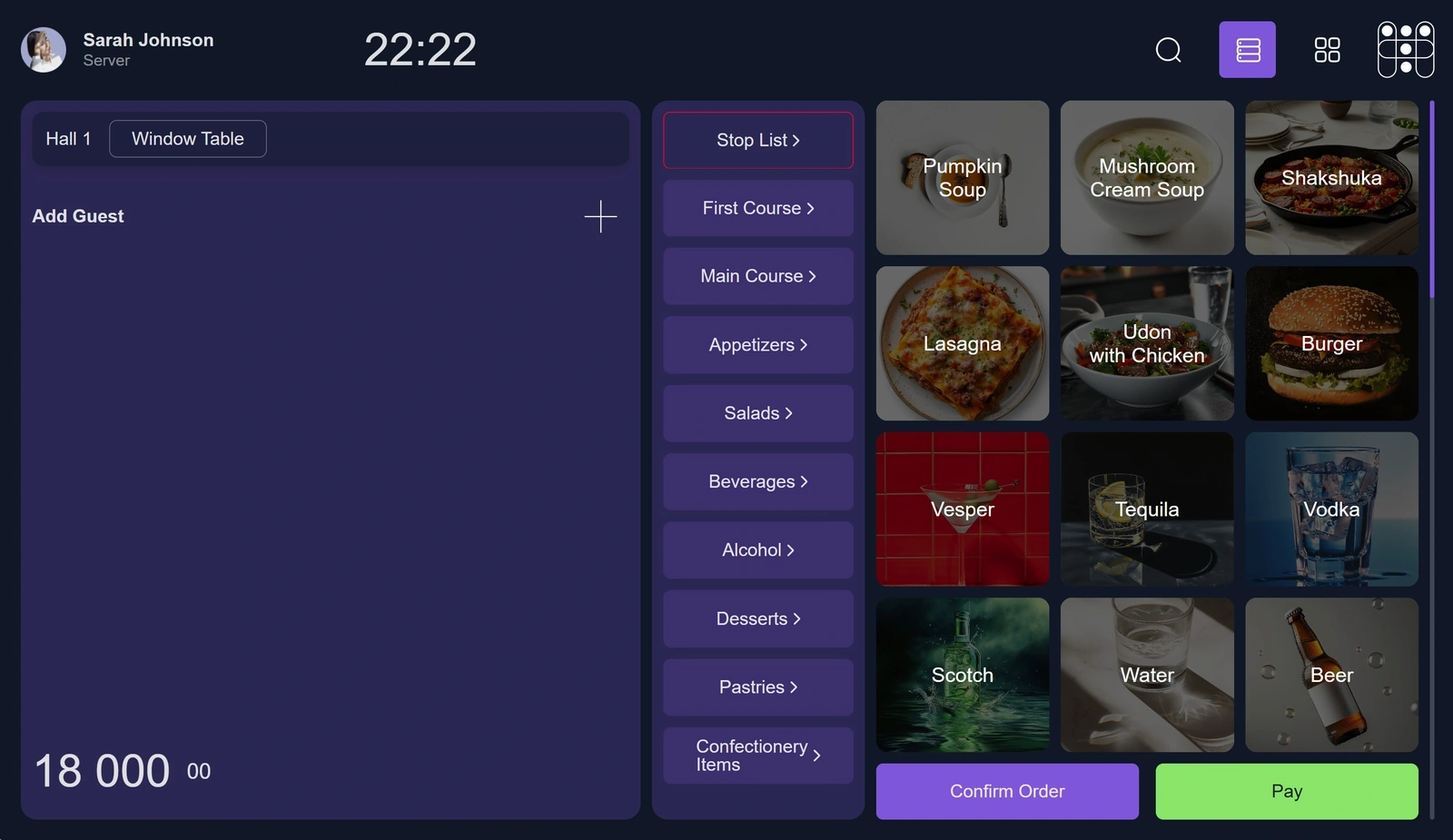
Give restaurant teams their attention back.
TableHero began with a hospitality problem: the software gets complicated precisely when service gets busy. The project brings the essential restaurant workflow into a visual workspace that works on the devices a team already carries.
The design brief is direct. Give staff a clear start to the shift, keep the floor plan and reservations within reach, make dishes easy to recognise, and bring order confirmation and payment into the same flow.
Photography gives the menu a recognisable visual rhythm. Categories stay within reach.
The guest, the running order and its total remain part of the same working surface.
Violet confirms an order. Lime marks the payment action. A small set of decisions carries the flow.
Less time navigating software.
More attention at the table.
The working view changes with the person using it. The visual language stays connected.
Order entry / Staff workspace
A photo-led menu sits alongside the active table. Guests, dishes and the running total stay together as the order takes shape.
Original desktop / tablet interface
From the big picture to the smallest ingredient. Explore the management workspace for menus, recipes, stock and the people who keep the restaurant running.
Analytics / Workspace
Sales trends, headline measures and product classifications share a single management view. Period controls and a calendar keep the review tied to a clear time frame.
Select a workspace to see its original screens and interaction states.
Original back-office designs from the TableHero project files. Names, figures, prices and dates are sample interface content. The compact mobile summaries are adapted for this case presentation.
A table is the anchor. Each action changes the order without losing the setting in which it was taken.
Choose the location and add a guest.
Find dishes through images and categories.
Review the order and move it forward.
Keep the total and payment in context.
Original design assets preserve the product’s visual direction. Select a frame to inspect it.
The original presentation film.
The original bar app concept film.
Films load from YouTube only when selected. TableHero film Customer exploration film
Dish. Switch. Monogram. Five circles and three rounded outlines come together in the TableHero identity. Explore the original construction, one idea at a time.
03 / Monogram
Circular dishes and rounded switches resolve into the T and H. The dotted construction circle frames the complete mark.
Complete · replay to see the construction again
The source interface puts violet work areas against a dark base, then reserves lime for the decisive payment action.
#101828#2A2752#7F56D9#89E469Inter shapes the source product interface. Manrope gives this case its editorial voice.
Clear focus states, visible selections and reduced-motion support carry into the interactive presentation.
Original project imagery and interface screens are reproduced from the TableHero case archive. Original project archive . Interactive examples on this page are reconstructions with illustrative data. The customer bar app is presented as an ordering exploration.
Next interface / Food delivery